Windows 365 vs. Azure Virtual Desktop (AVD): Choose the Right Solution
- Florian Salzmann
- Posted on 01 Oct, 2024
- Updated on 27 Nov, 2026
- 04 Mins read
- Microsoft Intune,Windows 365
Windows 365 and Azure Virtual Desktop (AVD) both give your users a Windows desktop in the cloud. The main difference is who runs the infrastructure. With Windows 365, Microsoft does. With AVD, you do, in your own Azure subscription. That decision drives everything else: setup effort, pricing, scaling and how much you can customize.
What Are Windows 365 and Azure Virtual Desktop?
Windows 365 gives each user a Cloud PC: a personal Windows machine that Microsoft hosts and that you manage in the Microsoft Intune admin center like any other device. You pay a fixed monthly price per license.
Azure Virtual Desktop runs on virtual machines in your Azure subscription. You build the host pools, session hosts and networking yourself and pay for the Azure resources you use. In return you can deliver full desktops or single apps, and several users can share one session host.
Windows 365 vs. AVD at a Glance
| Aspect | Windows 365 | Azure Virtual Desktop (AVD) |
|---|---|---|
| Infrastructure | Hosted and run by Microsoft | Virtual machines in your own Azure subscription |
| Pricing model | Fixed monthly price per license | Azure compute, storage and networking, pay-as-you-go or reserved instances |
| Licensing | Windows 365 license; Enterprise also needs Windows E3, Intune and Entra ID P1 | Eligible license per user (e.g. Microsoft 365 E3/E5, Windows E3/E5), plus the Azure costs |
| Management | Microsoft Intune admin center | Azure portal for the infrastructure; session hosts in Intune, depending on the join type |
| Sessions | Single session, one user per Cloud PC at a time | Single session or Windows 11/10 Enterprise multi-session |
| Scaling | Add licenses, resize Cloud PCs | Scaling plans start and stop session hosts on a schedule or by demand |
| Apps | Full desktop | Full desktop or RemoteApp for single apps |
| Ideal for | Personal desktops, smaller IT teams, predictable cost | Multi-session, published apps, large or fluctuating user numbers |
Deployment
Windows 365:
- With the Microsoft-hosted network you don’t need any Azure resources. You create a provisioning policy in Intune, assign licenses, and the Cloud PCs are provisioned automatically.
- If the Cloud PCs need to reach your on-premises network, you use an Azure network connection (ANC) to your own virtual network. That requires an Azure subscription.
- Windows 365 Enterprise lets you upload up to 20 custom images. Otherwise you pick one of the gallery images.
Azure Virtual Desktop (AVD):
- You need an Azure subscription and set up host pools, session hosts, application groups and a workspace, plus the virtual network and the identity side (Entra join, hybrid join or AD DS).
- You maintain images, session hosts and FSLogix profiles yourself. In return you control every layer.
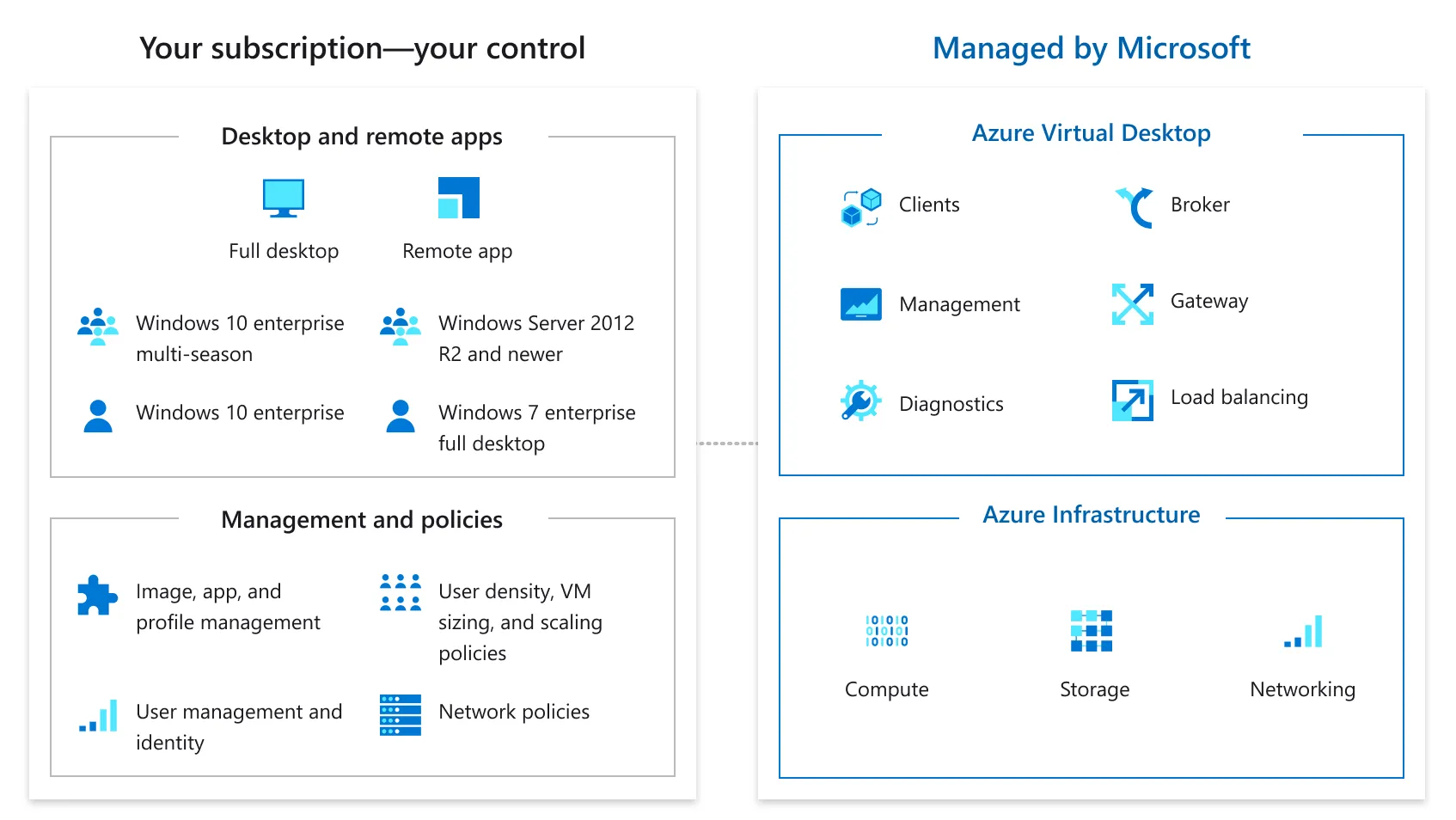
Microsoft’s responsibility diagram for AVD shows the split. The OS list in it is dated: current session hosts run Windows 11 or 10 Enterprise (multi-session) or Windows Server.
Pricing and Licensing
Windows 365:
- One license per Cloud PC at a fixed monthly price, sized by CPU, RAM and storage. You know the cost per user before you start.
- Editions: Business (up to 300 seats), Enterprise, and Flex (formerly Frontline). A Flex license covers up to three Cloud PCs that are used one at a time, or one Cloud PC shared by a group of users. More on the editions in Windows 365: Business vs Enterprise vs Frontline.
- Enterprise users also need Windows E3, Intune and Entra ID P1. In most Microsoft 365 E3/E5 tenants that’s already covered.
Azure Virtual Desktop (AVD):
- You pay for the Azure resources: VMs, disks, storage and networking, either pay-as-you-go or with one- or three-year reserved instances.
- Internal users need an eligible license such as Microsoft 365 E3/E5 or Windows E3/E5. For external users there is per-user access pricing.
- Costs follow usage. Without scaling plans and right-sized VMs, AVD gets expensive quickly.
Use Cases
I always recommend thinking about your specific use case before deciding.
Windows 365 fits when:
- users need a personal, persistent desktop, for example for external access or contractors
- you need a machine for apps that are rarely used, like an older ERP client
- your IT team is small and already manages devices in Intune
- you want a fixed cost per user
That’s also why Windows 365 is my first choice for most VDI scenarios. I wrote about it in Why I Absolutely Love Windows 365.
Azure Virtual Desktop (AVD) fits when:
- many users share session hosts with Windows Enterprise multi-session
- you want to publish single apps with RemoteApp instead of full desktops
- the number of users changes during the day and you only want to pay for running session hosts
- you need full control over VM sizes, images and networking
Scaling
Windows 365: You scale by buying licenses. Each Cloud PC has a fixed size, which you can resize later. For shift workers or seasonal staff, Flex licenses lower the cost per user. See Managing Seasonal Workforce with Windows 365 Frontline.
Azure Virtual Desktop (AVD): Scaling plans power session hosts on and off on a schedule. For pooled host pools, dynamic autoscaling can also create and delete session hosts based on demand.
Customization and Control
Windows 365: Microsoft runs the backend. You control the image, the size and everything Intune manages on the Cloud PC, but not the hosts underneath.
Azure Virtual Desktop (AVD): You control the images, VMs, session hosts, networking and user density. That’s the right fit for IT teams that need to fine-tune every detail and have the Azure skills to run it.
Which One Should You Choose?
Choose Windows 365 if:
- you want personal desktops that are quick to deploy
- you want a fixed monthly cost per user
- you manage your devices in Intune and don’t want to run Azure infrastructure
Choose Azure Virtual Desktop (AVD) if:
- you need multi-session or RemoteApp
- you want to scale session hosts with demand
- you have the Azure know-how to run and optimize the environment