Google Search Stopped Working in Microsoft Edge (Build 154.0.4258.37)
- Florian Salzmann
- Posted on 28 Sep, 2026
- 04 Mins read
- Troubleshooting
ℹ️ Update, October 2026: fixed in Edge 155.0.4283.45. Microsoft resolved this issue with the Stable release of version 155.0.4283.45 (October 8, 2026). Update Edge and Google Search works as the default search provider again. Details are in the Microsoft Edge Stable channel release notes. The workarounds below are only needed if you can’t update yet.
Google Search stopped working as Microsoft Edge’s default search provider starting with build 154.0.4258.37, released September 24, 2026. Type a query into the address bar and hit Enter, and nothing useful happens: no navigation, no error, no fallback page. I ran into this myself, and it’s specific to search terms — typing the start of a URL that’s already in your history still works fine through Edge’s autocomplete. It’s the “build a search query from the default provider” path that silently dies.
The cause is a stricter OpenSearch URL-template check Edge now applies to search providers: a Google search URL carrying extra query parameters beyond a bare q={searchTerms} is now more likely to be rejected or mangled than it was a few builds ago. Setups where Google is pushed via Intune/MDM policy (DefaultSearchProviderSearchURL) are hit hardest, and manually configured setups aren’t fully immune either. The fix: replace the search URL with Google’s full OpenSearch template (all macros, not a trimmed one) — see the workarounds below.
Other people are seeing variations of the same problem:
- The address bar returns a blank or broken results page, or silently falls back to Bing.
- The query string gets mangled. A search for
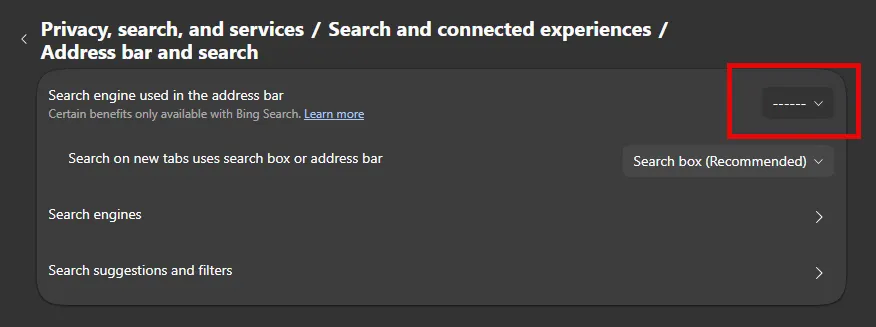
helloturns intohellooq=hello, because an extraoq=parameter gets appended instead of handled correctly. - Google disappears entirely from Settings → Privacy, search, and services → Address bar and search → Search engines, so it can’t even be re-selected as default.
Why is this happening?
Here’s the theory that fits best. Edge has been tightening validation of the OpenSearch URL template search providers use. Recent builds enforce a stricter, more literal match on the %s / {searchTerms} placeholder in a provider’s search URL.
In practice, that means a Google search URL with extra query parameters (tracking params, region codes, anything beyond a bare q={searchTerms}) is now more likely to get rejected or mishandled than it was a few builds ago.
Intune/MDM-managed setups get hit hardest. Those policy-pushed URLs are exactly the ones that tend to carry extra parameters. And a rejected or corrupted entry can also damage Edge’s local Web Data store, which is why Google sometimes vanishes from the list entirely instead of just searching wrong.
I’m not guessing at this. It’s the pattern that shows up consistently across multiple Microsoft Q&A threads describing this exact failure throughout 2026, in both consumer and MDM-managed Edge installs.
How do I fix Google Search in Edge?
None of these are a real fix. They’re what’s actually worked for people until Microsoft addresses it properly.
1. Use Google’s full OpenSearch template instead of a trimmed-down one.
Counterintuitively, going more complete rather than less is what fixed it for me. Instead of a stripped-down q={searchTerms} URL, use Google’s actual OpenSearch template with all of its macros:
{google:baseURL}search?q={searchTerms}{google:RLZ}{google:originalQueryForSuggestion}{google:assistedQueryStats}{google:searchboxStats}{google:searchFieldtrialParameter}{google:language}{google:prefetchSource}{google:searchClient}{google:sourceId}{google:searchSource}{google:contextualSearchVersion}ie={inputEncoding}This is the template Chromium-based browsers ship internally for Google. Using it verbatim, instead of a hand-simplified version, avoids whatever the stricter validation is tripping over.
A plain, minimal URL works for some people too. If the full template doesn’t stick, try:
https://www.google.com/search?q={searchTerms}2. Check your Intune/MDM policy.
If Google is pushed via DefaultSearchProviderSearchURL, review the exact URL value. Strip out any query parameters beyond q={searchTerms}. If you can’t fix it centrally right away, temporarily back off the policy and let affected users configure Google manually as a stopgap.
3. Reset Edge’s search-provider data.
If Google has vanished from the list entirely, Edge’s local Web Data file is probably corrupted. With Edge fully closed:
taskkill /im msedge.exe /f
ren "%localappdata%\Microsoft\Edge\User Data\Default\Web Data" "Web Data.bak"
Restart Edge. It regenerates the file, and the default search engine list, including Google, should be selectable again.
Frequently asked questions
Why did Google Search stop working in Microsoft Edge?
Microsoft Edge build 154.0.4258.37 (September 24, 2026) tightened validation of the OpenSearch URL template browsers use for search providers. Google search URLs with extra query parameters beyond q={searchTerms} are now more likely to be rejected or mangled, which is why the address bar stops returning results, mangles the query string, or drops Google from the search-engine list entirely.
How do I fix Google Search in Microsoft Edge?
Replace your Google search provider URL with Google’s full OpenSearch template (all macros, not a trimmed-down version) — see the workarounds above. If Google has disappeared from the search-engine list entirely, close Edge and rename its Web Data file so Edge regenerates it.
Is this specific to Intune/MDM-managed devices?
No, but it shows up most consistently there. Google search URLs pushed via DefaultSearchProviderSearchURL policy tend to carry extra query parameters, which is exactly what the stricter validation rejects. Manually configured Google search providers aren’t fully immune either.
Has Microsoft fixed this yet?
Yes. The issue is fixed in the Stable release of Microsoft Edge 155.0.4283.45 (October 8, 2026). If you can’t update yet, using Google’s full OpenSearch template is the most reliable workaround.
Conclusion
Microsoft fixed Google Search breaking in Edge with the Stable release of 155.0.4283.45 on October 8, 2026. This looked like Edge tightening search-provider URL validation and catching Google configurations off guard, especially policy-managed ones, rather than anything Google changed on their end. Update Edge to get the fix. Until then, using Google’s full OpenSearch template, and cleaning up your Intune policy if you manage one, is the most reliable way to keep Google search working.