My Top 5 Intune Community Tools
- Florian Salzmann
- Posted on 01 Dec, 2022
- Updated on 17 Aug, 2023
- 03 Mins read
- Microsoft Intune
Intune itself already offers many functions that are constantly being improved and expanded. Nevertheless, there are always little things that I would like to see differently or that have to be implemented outside of the integrated possibilities due to a customer request. Community tools for and around Intune often help with this. In this post, I want to present the top Intune Community Tools that I use the most.
Of course there are many other great community tools, but I have deliberately limited myself to the ones I use the most.
The tools that are described are as of December 2022.

IntuneManagement
Are you also a big fan of creating documentation and clicking together the same guidelines?
Right? Neither do I! 😉
Luckily has to Mike Karlson developed the “IntuneManagement” tool, because it can document it for you and copy configurations from one tenant to the next.
Features briefly summarized:
- Copy individual/all configurations
- Document configurations
- Comparing configurations
- … everything for Intune and Conditional Access!
IntuneWin32App

The PowerShell module “IntuneWin32App” allows you to create, upload and assign Win32 apps via PowerShell. You can either create individual apps or write your own tool / function.
The great module has Nickolaj Andersen is constantly developing and adding new features and improvements.
I myself use the PowerShell module in my tool, the “Intune Win32 Deployer”.
Features briefly summarized:
- Create Win32 apps (intunewin)
- Upload Win32 apps to Intune, including detection (registry, file or script)
- Show Win32 apps
- Assign Win32 apps
- Manage Win32 app dependencies
- Manage Win32 App Supersedence
IntuneDeviceInventory
The IntuneDeviceInventory is a PowerShell module and allows you to add custom fields to existing Intune device objects and to manage them. In addition, there is also a UI that simplifies the whole administration a lot.
I use the module in some smaller environments in which, for example, no access management is used. So I managed all the information centrally, such as which monitor or which peripherals belong to a device.
In addition, you can use a one-liner to trigger mass actions such as synchronization, Defender updates or reboots for groups or all devices.
I have the module including UI together with Jannik Reinhard developed.
Features briefly summarized:
- Maintain custom fields in Intune
- Perform Intune bulk actions
- Group-based, user-based or for everyone
- All via PowerShell or UI

IntuneDeviceInventory PowerShell Module
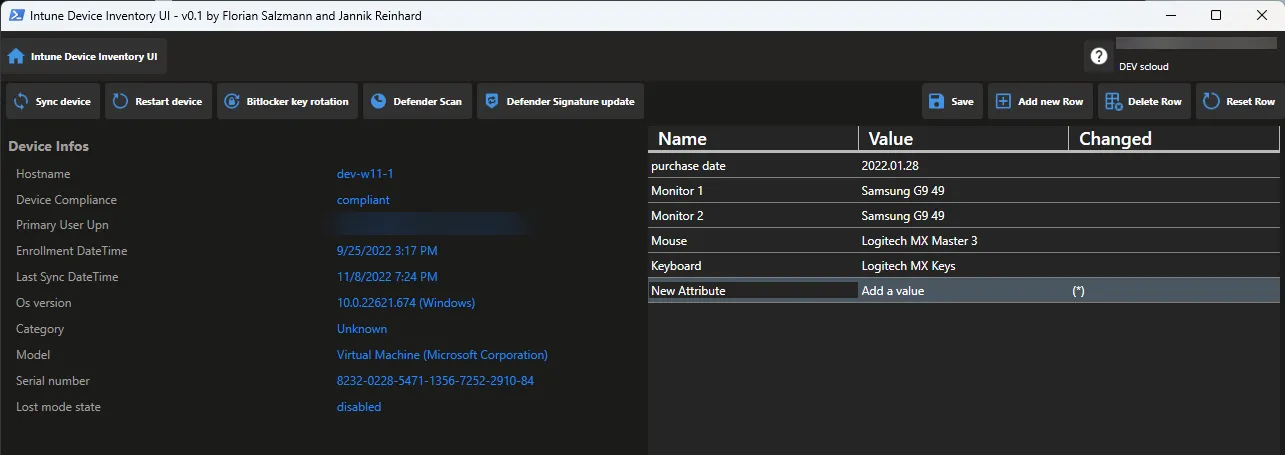
IntuneDeviceInventory UI
SyncMLViewer
In every environment there are always problems that cannot be easily identified. The log that Intune offers is also not easy to interpret. But it helps here Oliver Kieselbach with his tool, the SyncML Viewer. This shows you in real time what configuration is received on a device such as OMA-Uris. In addition, it offers a search (CRTL + F) with which you can quickly jump to the desired passages in the stream.
To use it, simply run the tool as an administrator on the desired device and initiate an MDM synchronization.
Features briefly summarized:
- Real-time stream of the SyncML protocol (XML)
- Viewing individual sessions
- Status code references according to OMA SyncML Representation Protocol documentation

Intune Debug Toolkit
Intune Debug Toolkit
With the Intune Debug Toolkit we have arrived at the “jack of all trades” among the troubleshooting tools. The tool is powered by Mattias Melkersen maintained, but is a collection of different community members.
Explaining all the features would fill a separate blog post and more. Fortunately, the tool offers an overview page with docs, examples and more.
So if you’re ever faced with any Intune problem, be sure to take a look at this great tool!
Intune Debug Toolkit, Overview
Intune Debug Toolkit Features / Tools:
- DEBUG enrollment
- DEBUG GPO
- DEBUG Intune Management Extension
- DEBUG Policy Manager
- AUTOPILOT Pre-Provisioning Readiness (Run as Admin)
- AUTOPILOT Readiness (Run as Admin)
- DEVICE Details Debug (Requires Authentication)
- DIAGNOSTIC Data
- ERROR CODES And Solutions
- MDM event log monitor
- Monitor Sync Data Live
- OVERVIEW OF ASSIGNED POLICIES (RSOP)
- RERUN Apps Win32 (Run as Admin)
- VIEW Proactive Remediation Scripts
- WUFB Readiness

BONUS: OSDCloud

The OSDCloud tool is not directly an Intune tool, but it can make your everyday work a lot easier when it comes to new installations. It is primarily used by David Segura maintained and offers, as the name suggests, an OS deployment method via cloud.
Features briefly summarized:
- Install Windows over the Internet
- Simply install a specific Windows version including drivers
- Custom ISO (also possible via Azure)
- Preinstall manufacturer drivers
- Microsoft, HP, Lenovo, Dell and custom drivers
Has a great guide to get started with OSDCloud that goes beyond the standard features to deploying a custom ISO via Azure Akos Bakos compiled in his blog series: OSD Cloud Blog Series
Do you have another top Intune community tool that needs to be on the list?
Then let me know, I would be happy to expand the collection 🙂